

If you want to strengthen your brand's visibility and capture users who are interested in your business, a brand Search campaign on Google Ads is an excellent choice. This type of campaign promotes your brand specifically by optimizing search results around your name, products or services. This guide walks you through each step of creating your campaign.
Step 1: Sign in to Google Ads
Before you start, you need to sign in to your Google Ads account. Make sure you are in the right ad account to avoid any mistakes when creating your campaign.
Steps:
1.1. Open your Google Ads account
Open Google Ads on your computer and sign in with your credentials.
1.2. Select the right ad account
Check that you are signed in to the account that matches the campaign you want to create.
Step 2: Create a new campaign
Once you are signed in, the next step is to create a new campaign. Follow these steps to set up your brand Search campaign.
Steps:
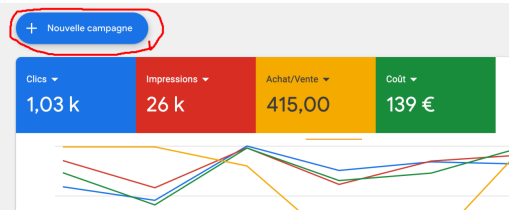
2.1. Click "New campaign"
Once in your account, click the button to create a new campaign.
2.2. Choose the campaign objective
Select the "Search campaign" option (text ads). This keeps your campaign focused on text ads that appear in Google search results.
2.3. Set bidding and budget
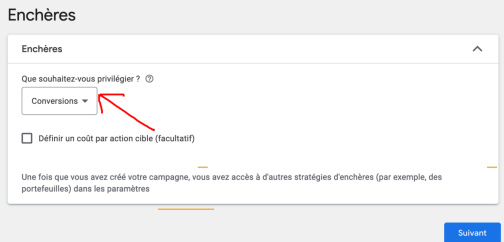
Go for bidding based on "Conversions". This helps you manage your advertising budget better while focusing on what users do after seeing your ads.
Step 3: Target your audience
An effective brand Search campaign relies on precise targeting. It is crucial to define your audience's locations and languages to maximize the impact of your ads.
Steps:
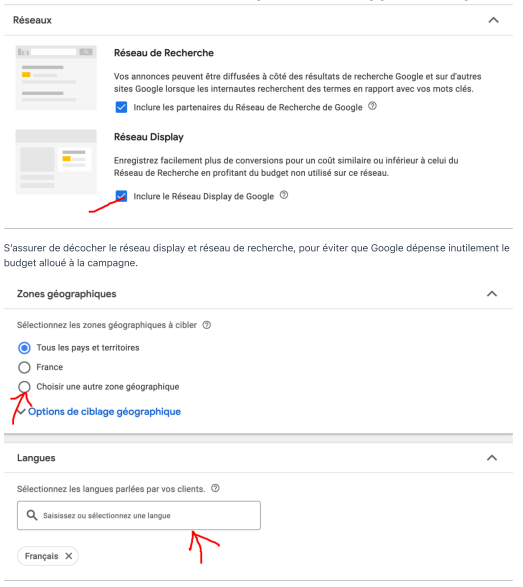
3.1. Select locations
Choose the regions where your products or services are available. This ensures you reach a relevant audience.
3.2. Set languages
Target the languages your customers speak to make your ads more relevant.
3.3. Exclude irrelevant networks
Uncheck the Display Network and search network options to avoid wasted spend and target only relevant searches.
Want to go further? Read our guide on optimizing Google Ads campaigns.
Step 4: Choose your keywords
Keywords are at the heart of your brand Search campaign. Choose keywords that include your brand name, its variants and related terms. This lets Google show your ads when users search for information related to your brand.
Steps:
4.1. Select keywords around your brand
For example, if your brand is "Coca-Cola", use keywords such as "Coca-Cola Drink", "Coca-Cola" or "Coca-Cola Beverages". Make sure you vary the terms to capture as many related searches as possible.
4.2. Use quotation marks for more precision
Putting your keywords in quotation marks (e.g. "Coca-Cola") lets Google show your ads whenever that term or a variation of it is searched.
Step 5: Create eye-catching ads
Headlines and descriptions play an essential role in capturing users' attention. Create several variations to test which ones generate the most interactions, and optimize them based on the results.
Steps:
5.1. Write punchy headlines
Headlines must include your brand name and be catchy. You can test different variations to see what works best.
5.2. Write descriptions that add value
In your descriptions, explain why a user should choose your brand over another. Highlight the unique advantages of your products or services.
5.3. Add visual elements
If possible, include elements such as your logo or product images to make your ads even more appealing.
Step 6: Set a daily budget
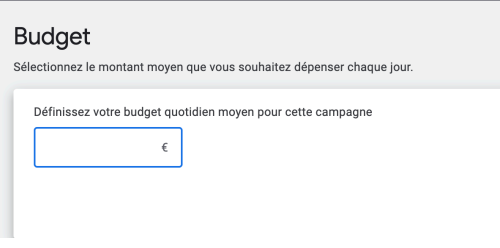
One of the last steps before launching your campaign is setting a daily budget. This budget should match your marketing and advertising goals.
Steps:
6.1. Set a reasonable budget
Start with a moderate budget and adjust it based on the results you get. This lets you test how effective your ads are without risking going over your financial limits.
6.2. Launch the campaign
Once the budget is set, you are ready to publish your campaign and monitor it to maximize its performance.
Key takeaways
Creating a brand Search campaign on Google Ads is an excellent way to build your brand awareness. By following these simple steps, you can set clear goals, target a precise audience and optimize your advertising budget. It can also be worth complementing your strategy with professional services such as web SEO strategy or Google Ads expertise on Fiverr.
Mini FAQ
-
How do I choose the right keywords?
Go for keywords that include your brand name and its variations. Use quotation marks to make your targeting as precise as possible. -
What budget should I allocate to my campaign?
Start with a moderate budget and adjust it based on your ads' performance. -
Can I use visual ads for my brand Search campaign?
Yes, although the campaign is mainly text-based, you can enrich your ads with visual elements such as your logo or product images to capture more attention.