



In online commerce, Stripe has become a reliable, versatile payment solution, especially for subscriptions and services sold through payment links. This guide walks you through the complete setup of your Stripe account and the management of your subscriptions and payments.
What is Stripe?
Stripe: a simplified online payment platform for businesses
Stripe is an increasingly popular online payment solution that lets businesses receive payments simply and securely. Whether for one-time or recurring payments, Stripe stands out for its ease of use, its flexibility and a polished interface, ideal for businesses of all sizes.
How to create and set up a Stripe account
1. Creating the account
The first step to start using Stripe is to create an account. Go to the official website and sign up by providing basic information about your business. You need an appropriate legal status to complete registration, whether as a sole proprietorship, a company or another legal form. The sign-up interface is intuitive, and you will be guided throughout the process.
2. Setting up legal information
Once your account is created, it is important to fill in all the required legal information. This includes details about your business, such as its name, address and legal pages, as well as its privacy policy. This information is needed to make sure your Stripe account complies with legal standards and to avoid any risk of suspension or blocking. Careful setup at this stage contributes to your account's security and compliance with local regulatory requirements.
3. Setting up your bank account
Setting up your bank account is the next step. You must link a valid bank account to your Stripe account to receive payments. It is strongly recommended to use a bank account that is already linked to your business transactions, to minimize currency conversion fees. Make sure all banking details are correct to avoid any service interruption during fund transfers.
4. Customizing your branding
Once the account is up and running, it is important to customize the look of your Stripe interface. Add your company logo and adjust the colors to create a visual experience consistent with your brand. This can build customer trust and make the payment interface more appealing. This customization is not only cosmetic: it also helps build a stronger connection with your customers, which is essential in the sales process.
5. Customer portal and invoices
To make recurring payments easier to manage, Stripe lets you create a dedicated customer portal. This portal gives your customers easy access to their subscriptions and invoices. Stripe also lets you customize your invoices so they better reflect your company's visual identity, including information such as your logo, your address and details about the products or services purchased.
6. Custom domain
Although this step is optional, it is strongly recommended to strengthen your business's visibility and credibility. By creating a custom subdomain for your online payments (for example, pay.yourdomain.com), you help strengthen brand recognition. Your customers know they are dealing directly with your business, which increases their trust in the payment process.
Creating products and payment links with Stripe
1. Adding products
In Stripe, you can easily create a catalog of products and services. Each product can include a detailed description, images and different possible payment types (subscription, one-time payment, etc.). For example, you can set up a monthly subscription for ad management or any other service. This makes management simpler and gives you a clear view of your offers.
2. Managing taxes
It is essential to configure taxes correctly to comply with the tax regulations of your country or the countries where you operate. Stripe lets you set up local taxes or VAT according to your customers' tax rules. This feature makes tax compliance easier by automatically calculating and applying the appropriate tax rates at payment time.
3. Creating payment links
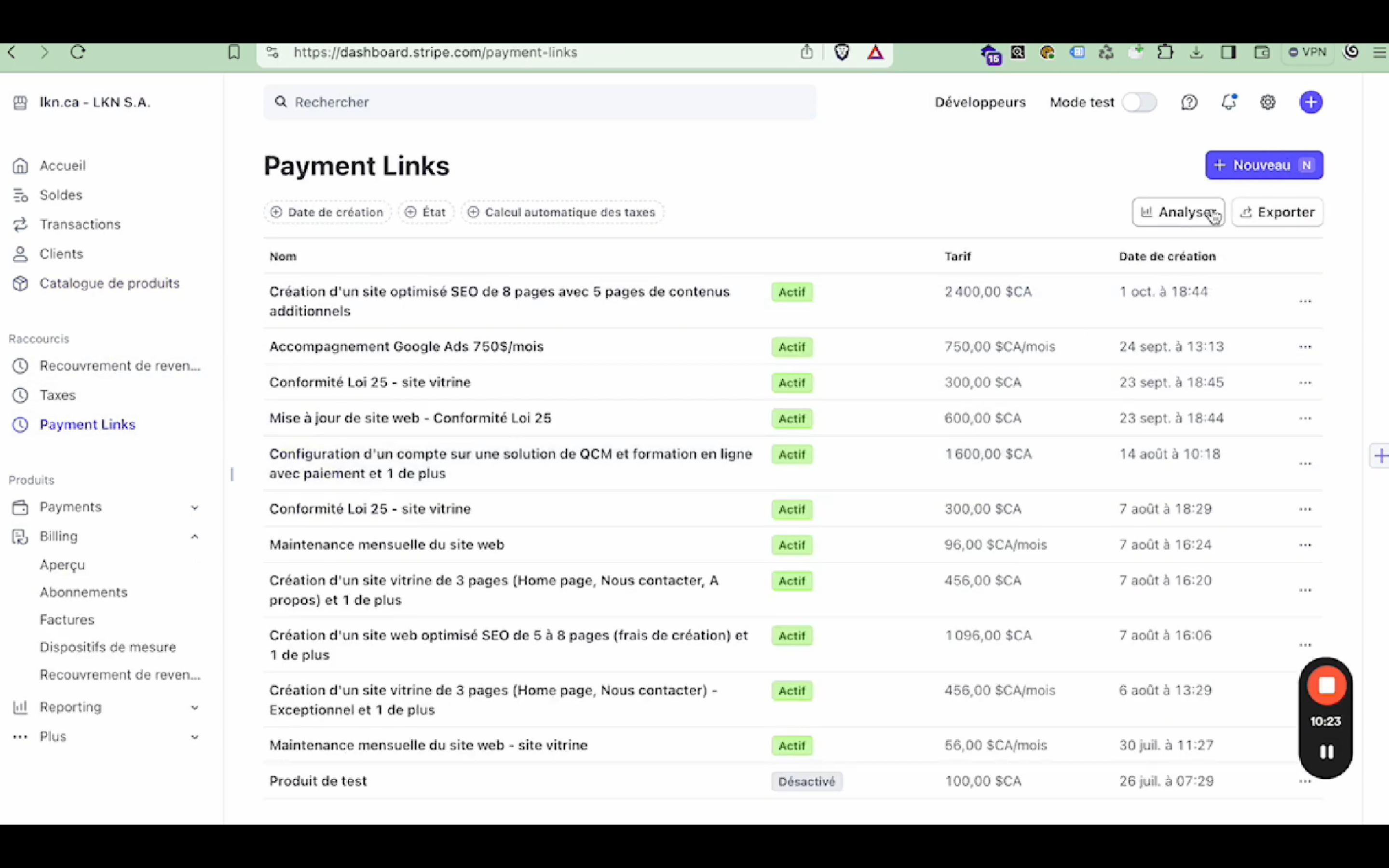
Stripe offers the "Payment Links" feature to create payment links that are easy to share with your customers. You can generate links for individual products or combine several products into a single link. These links can be sent directly by email or embedded on your website, giving your customers a fast, convenient way to pay.
Adding payments to your website and managing subscriptions with Stripe
1. Adding payments to your website
Stripe makes it easy to integrate payments on your website with simple, ready-to-use HTML code. In a few steps, you can offer subscriptions or recurring payments directly on your site, providing a smooth, secure user experience. This integration is effortless, and you can customize the look of the payment forms so they blend perfectly with your design.
2. Managing subscriptions
Customer portal for subscription management
Stripe offers a customer portal feature that lets your subscribers manage their subscriptions on their own. This portal has several advantages: your customers can view their billing history, update their payment information or change their subscription plan as needed. This greatly simplifies subscription management while reducing the administrative workload for your business.
Automated reminders
Another advantage of Stripe is automated reminders for failed payments. You can set up automatic reminders by email or SMS to let subscribers know their payment has failed. This feature improves payment recovery while reducing service interruptions for your subscribers. By automating these processes, you save time and minimize human error.
Advanced options
Stripe allows flexible, advanced subscription management. You can easily pause or change a subscription, adjust payment plans or set an end date. For example, if a subscriber wants to change their plan or pause their subscription, it can all be done in a few clicks from the Stripe interface, giving your business and your customers a lot of flexibility.
Security and practical advice
Never sell your Stripe account
It is essential to protect your Stripe account. Under no circumstances should you hand your account over to another person or company, even if you receive offers to buy it. This could expose your business to fraud risks and security breaches. Your Stripe account is linked to sensitive information, and selling it could have serious consequences.
Handling disputes
Stripe offers a dispute option if you have a disagreement with a customer, which can be a valuable asset to resolve problems quickly. However, it is important to have clear, solid contracts with your customers so you can handle conflicts effectively. A well-written contract can help you prove the validity of your transactions and avoid complications during disputes.
Alternatives to Stripe

Although Stripe is very popular and reliable, some users look for alternatives because its fees can be high. Solutions such as PayPal or Square can be considered depending on your business's specific needs.
Conclusion
Stripe offers a complete solution to manage your online payments and subscriptions simply and efficiently. By following this setup guide, you optimize the management of your transactions and offer a secure, professional customer experience.
To go further, check out our complementary services: